Find the hand-in point before searching further
The referenced route uses a Power Box beside the red mesh gate. Locate that panel and remember the return path. It is the place to install the fuses, not simply another door to search beyond.
Complete the installation and the clock objective
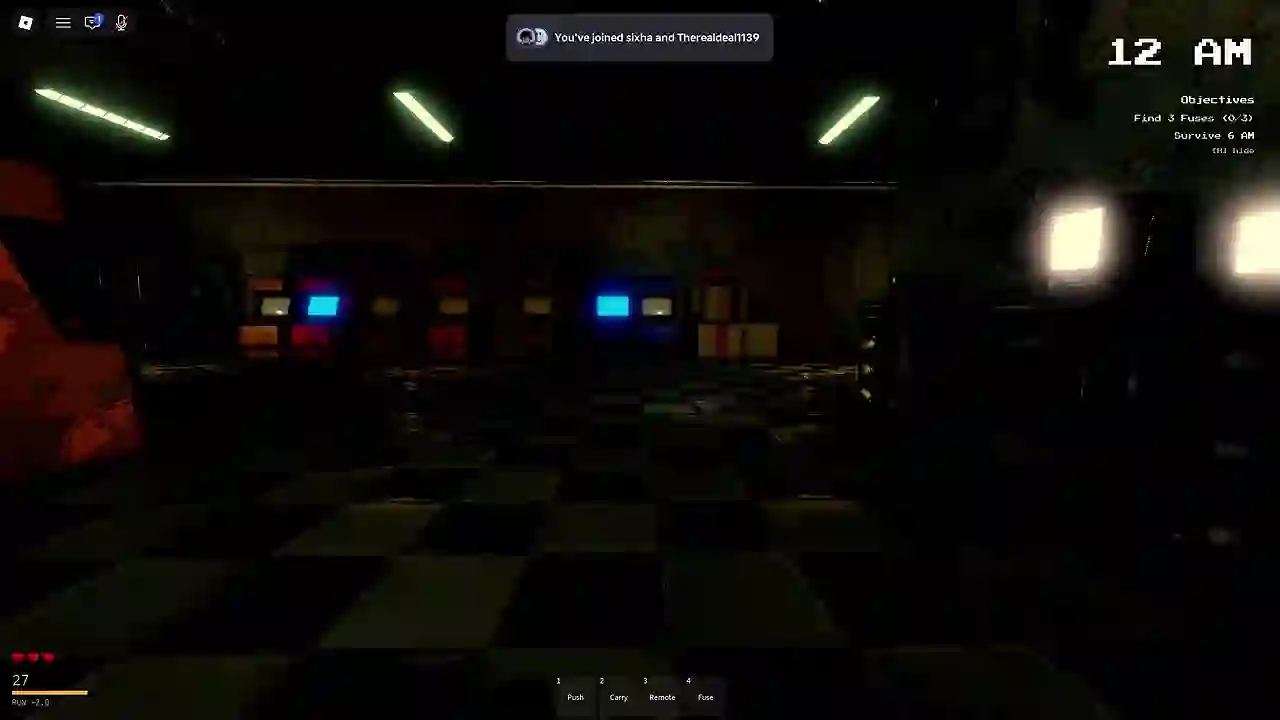
- Collect a fuse. Use the interaction prompt shown on your device and check that you are carrying the item. Do not assume the objective counter measures everything in your inventory.
- Return to the Power Box. Use its fuse-insertion interaction with a carried fuse, then check the remaining requirement. Repeat until the installation is complete.
- Keep the time objective in view. Finishing the installation early does not remove the separate instruction to survive until 6 AM.
- Finish the outstanding task before leaving. When the clock condition is complete, check the gate and fuse progress too. An exit banner should not be treated as proof that you have already installed every fuse. Once the required tasks are complete, use the exit.
Gameplay reference: Power Box interactions and recorded exit states. The exit-condition comparison also separates the installation from the timer.
When progress looks stuck
| What you see | What to check next |
|---|---|
| A fuse is in your inventory, but progress is still incomplete | Return to the installation panel rather than treating the item as already submitted. |
| The fuse task is complete before 6 AM | Continue surviving; the clock is a separate objective. |
| The clock reaches 6 AM with fuses still missing | Finish the outstanding installation and recheck the gate. |
| You cannot find the last fuse | Search accessible areas in your current round. This guide does not establish a permanent spawn or a fixed-versus-random placement rule. |
The visible objective-screen reference is useful for distinguishing the inventory from objective progress. It is not a spawn-location map.
What does the Remote Pass confirm?
The official catalog describes Pizzeria door control. It does not establish a required purchase for completing the escape task. The available gameplay references also do not establish the recording players' pass ownership, so this guide does not claim a verified no-pass clear.
Do not buy the pass solely because another guide calls it a mandatory escape item. See the pass descriptions and evidence limits before making that assumption.
Ordinary escape and No Power are separate
Roblox lists separate Pizzeria achievements for these outcomes. Their existence does not reveal the No Power activation method. Use the badge-check reference to identify the result on your account; this page is not a verified No Power walkthrough.